
2026-04-06 (更新: 2026-05-20)
🔄 【ROS2入門⑥】サービスとアクション - 同期・非同期双方向通信をPythonで実装
シリーズ この記事は「ROS2入門シリーズ」の一部です。 シリーズ目次を見る
トピック通信を実装済みの状態から、サービス(短時間 Req/Resp)とアクション(Goal/Feedback/Result)を Python で組み立てます。turtlesim では「今の姿勢を即返す」処理と「数秒かかる移動」を用途で分けます。正本は Understanding ROS 2 services と Understanding ROS 2 actions です。2026年5月時点、Ubuntu 22.04 + ROS 2 Humble 想定です。
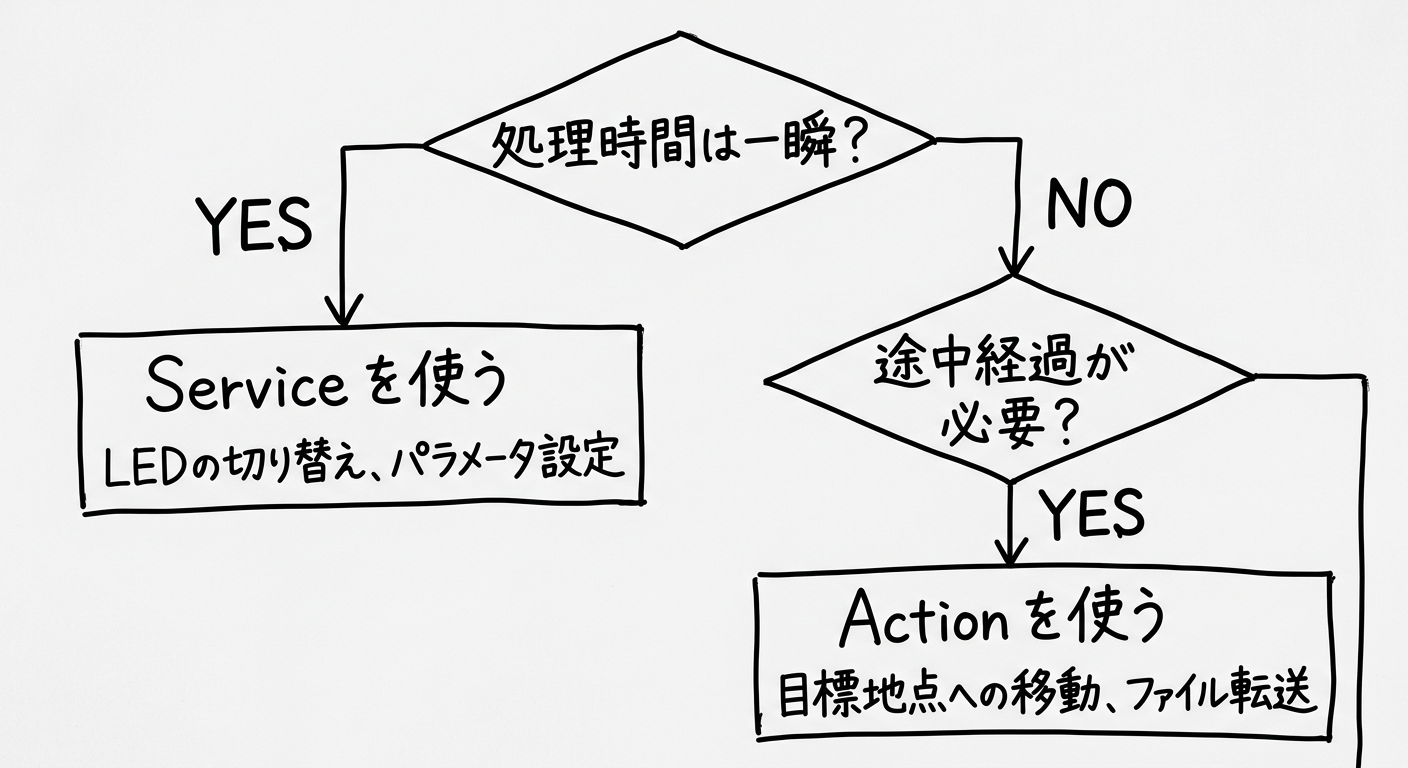
サービス vs アクション 比較
Python でサービス(Service)を実装する方法
サービスサーバー
# service_server_node.py
import rclpy
from rclpy.node import Node
from example_interfaces.srv import AddTwoInts


class AddTwoIntsServer(Node):

    def __init__(self):
        super().__init__('add_two_ints_server')
        self.srv = self.create_service(
            AddTwoInts,
            'add_two_ints',
            self.callback)
        self.get_logger().info('Service ready!')

    def callback(self, request, response):
        response.sum = request.a + request.b
        self.get_logger().info(f'{request.a} + {request.b} = {response.sum}')
        return response


def main():
    rclpy.init()
    rclpy.spin(AddTwoIntsServer())
    rclpy.shutdown()
サービスクライアント
call_async でリクエストを送ったあと、rclpy.spin_until_future_complete で 1 回分の応答を待ちます(内部では非同期 API)。本番構成ではイベントループ設計とも相性を確認すると安全です。Services tutorial も参照。
# service_client_node.py
import rclpy
from rclpy.node import Node
from example_interfaces.srv import AddTwoInts


class AddTwoIntsClient(Node):

    def __init__(self):
        super().__init__('add_two_ints_client')
        self.client = self.create_client(AddTwoInts, 'add_two_ints')
        while not self.client.wait_for_service(timeout_sec=1.0):
            self.get_logger().info('Waiting for service...')

    def send_request(self, a, b):
        req = AddTwoInts.Request()
        req.a = a
        req.b = b
        future = self.client.call_async(req)
        rclpy.spin_until_future_complete(self, future)
        return future.result()


def main():
    rclpy.init()
    client = AddTwoIntsClient()
    result = client.send_request(3, 4)
    client.get_logger().info(f'3 + 4 = {result.sum}')
    rclpy.shutdown()
my_pkg を再現する最短手順(Python / ament)
記事の ros2 run my_pkg ... を試すには、次の骨組みが揃っている必要があります(Humble 想定。パッケージ名・エントリ名は環境に合わせて読み替えてください)。
- ワークスペースを作成し、ros2 pkg create --build-type ament_python my_pkg で雛形を用意する。
- package.xml に少なくとも rclpy と、AddTwoInts 用の example_interfaces を depend として書く。
- ソースは my_pkg/my_pkg/service_server_node.py のようにパッケージ名の下へ置き、setup.py の entry_points['console_scripts'] に、たとえば service_server = my_pkg.service_server_node:main を登録する(クライアント側も同様)。
- colcon build --packages-select my_pkg のあと、必ず source install/setup.bash してから ros2 run する。
C++ で書く場合は ament_cmake 側の CMakeLists.txt と rclcpp 依存になりますが、「ビルドしてから source」という流れは同じです。
実行結果
# ターミナル1
ros2 run my_pkg service_server
# [INFO] [add_two_ints_server]: Service ready!
# [INFO] [add_two_ints_server]: 3 + 4 = 7

# ターミナル2
ros2 run my_pkg service_client
# [INFO] [add_two_ints_client]: 3 + 4 = 7
サービス実装でつまずきやすい点
- source install/setup.bash が無いと ros2 run がパッケージを見つけない、example_interfaces の import が失敗するなどが起きやすい
- サービスクライアントは サーバー起動順 が逆だと、wait_for_service がログを増やして待ち続けるだけになる(まずサーバー側を起動)
Python でアクション(Action)を実装する方法
アクションの流れ
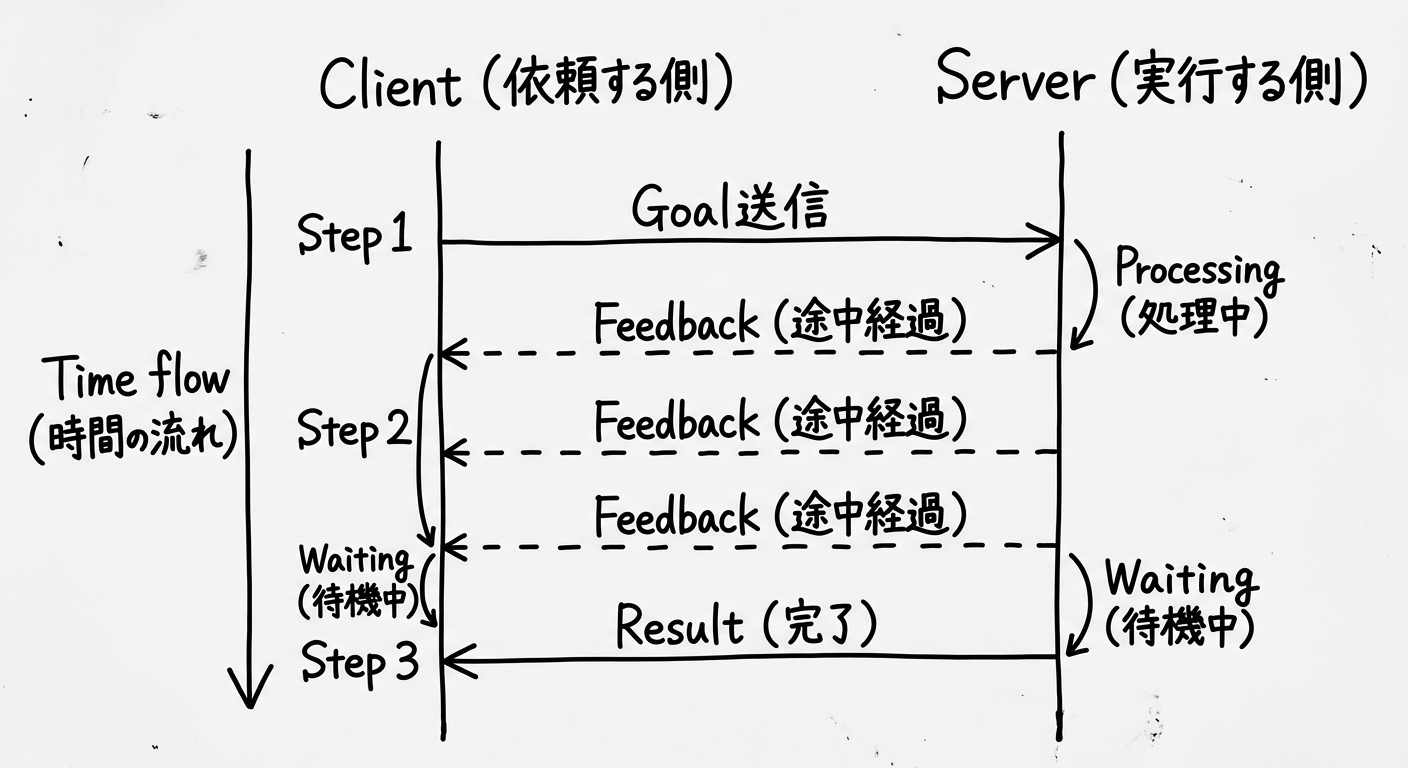
Actionシーケンス図
turtlesimでアクションを試す
# turtlesim起動
ros2 run turtlesim turtlesim_node

# アクション一覧
ros2 action list
# /turtle1/rotate_absolute

# 手動でアクション送信
ros2 action send_goal /turtle1/rotate_absolute \
  turtlesim/action/RotateAbsolute "{theta: 1.57}"
# Feedback: remaining: 1.52...
# Feedback: remaining: 0.98...
# Result: delta: -1.57...
# Status: SUCCEEDED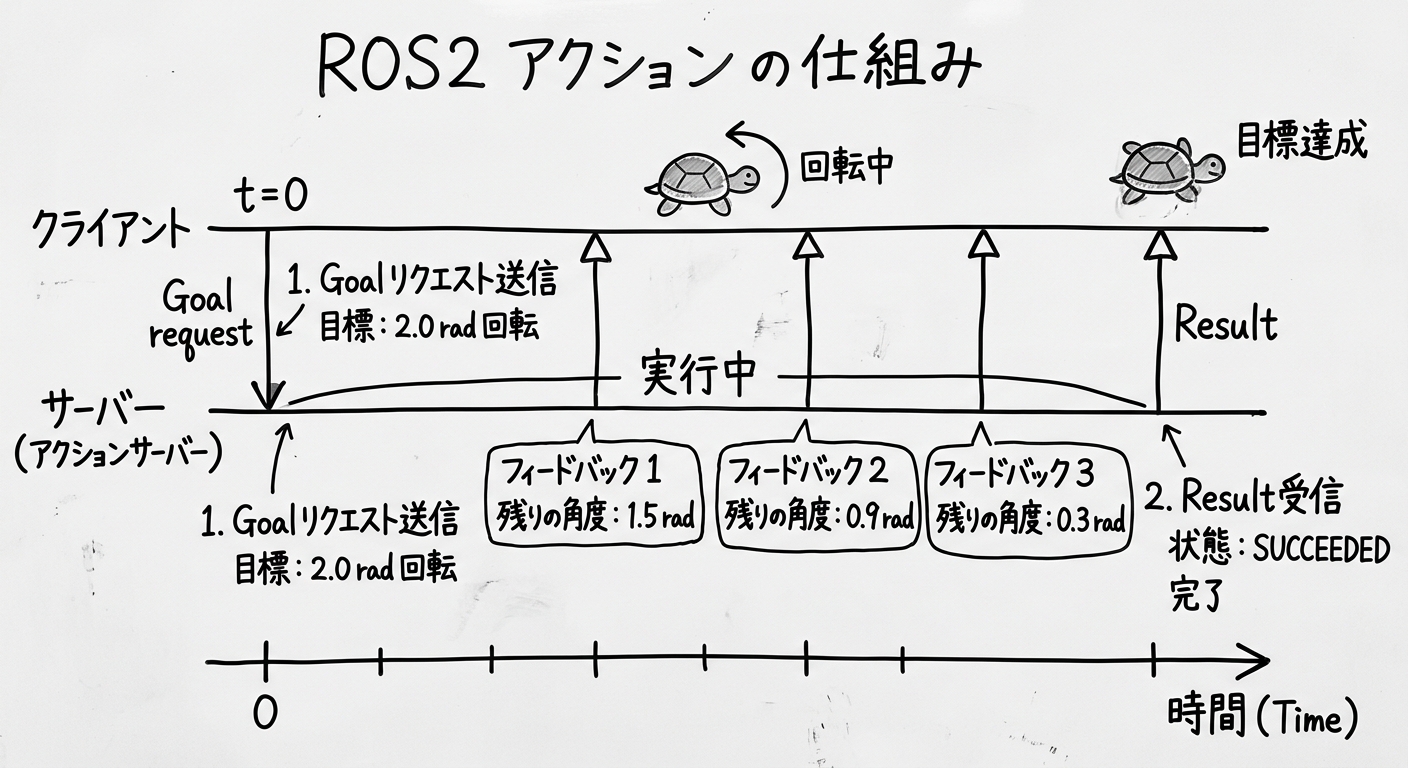
アクション実行タイムライン
Pythonでアクションクライアントを実装
# action_client_node.py
import rclpy
from rclpy.node import Node
from rclpy.action import ActionClient
from turtlesim.action import RotateAbsolute


class RotateClient(Node):

    def __init__(self):
        super().__init__('rotate_client')
        self._client = ActionClient(
            self, RotateAbsolute, '/turtle1/rotate_absolute')

    def send_goal(self, theta):
        goal = RotateAbsolute.Goal()
        goal.theta = theta
        self._client.wait_for_server()
        self._future = self._client.send_goal_async(
            goal, feedback_callback=self.on_feedback)
        self._future.add_done_callback(self.on_goal_response)

    def on_goal_response(self, future):
        handle = future.result()
        if handle.accepted:
            self.get_logger().info('Goal accepted!')
            result_future = handle.get_result_async()
            result_future.add_done_callback(self.on_result)

    def on_feedback(self, feedback_msg):
        # 途中経過を受信
        remaining = feedback_msg.feedback.remaining
        self.get_logger().info(f'Remaining: {remaining:.2f} rad')

    def on_result(self, future):
        result = future.result().result
        self.get_logger().info(f'Done! delta={result.delta:.2f}')
        rclpy.shutdown()


def main():
    rclpy.init()
    client = RotateClient()
    client.send_goal(1.57)  # 90度回転
    rclpy.spin(client)
サービスとアクションはどう選ぶ?判断基準
- 短く答えが返ればよい:サービス向き(例:パラメータ取得、短い計算)
- 処理が長く、途中経過を見たい:アクション向き(例:ナビゲーション、長いキャリブレーション)
冒頭の図と同じ整理です。詳細は Actions の解説も参照してください。
サービス・アクション実装のまとめ
- Service: create_service() + create_client() で実装
- Action: Goal / Feedback / Result の3メッセージ構成
- 判断基準は「処理時間」と「途中経過が必要か」
- 次回(シリーズ⑦)では、colcon とパッケージのひな型、launch を扱う想定です